macOS 版・iPhone 版どちらも公開中 Now on macOS and iPhone

人生を一本の線
記録する。
Record your life
on one line.

思ったこと、やったこと、これからやること。分類も階層もなく、
書いた順にただ並ぶ。Mac と iPhone のための、ローカルファーストな記録アプリ。
Thoughts, things done, things to do — no folders, no hierarchy.
Just the order you wrote them in. A local-first log for Mac and iPhone.

macOS & iPhonemacOS & iPhone
ローカルファーストLocal-first
記録は無料・無制限Unlimited logging, free
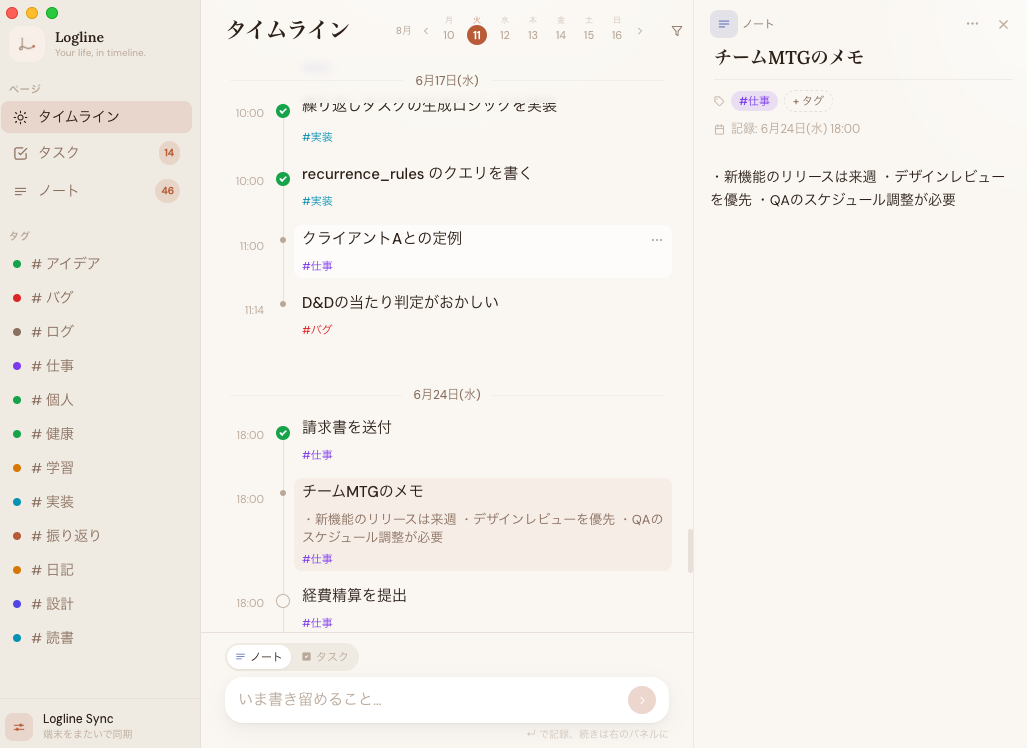
Logline for Mac — the timeline with the detail panel open beside it
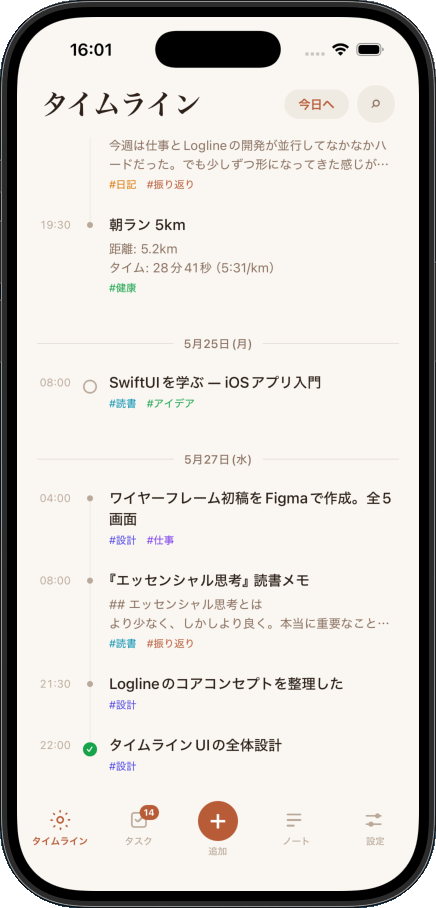
Logline for iPhone — the same timeline
こんな方のために作っています Built for people who 開発者・エンジニアDevelopers 研究者・ライターResearchers & Writers フリーランスFreelancers 深く考える人Deep thinkers 日常を記録したい人Daily loggers
機能Features

必要なものが、すべて揃っている Everything you need,
nothing you don't.

シンプルに保ちながら、日々の記録に必要な機能をすべて内蔵しています。 Kept simple, but with everything you need to log your days effectively.

一本のタイムラインOne Timeline

ノートもタスクも同じ線の上に、書いた順に並ぶ。持っている時刻は「記録した時刻」だけ。 Notes and tasks sit on the same line, in the order you wrote them. The only timestamp is when you captured it.

1行で記録するCapture in One Line

⌘N で記録バーへ。ノートかタスクかを選んで Enter。書き足したくなったら、その場で開く詳細パネルに続きを書ける。 ⌘N jumps to the capture bar. Pick note or task, press Enter. The detail panel opens right there if you want to keep writing.

全文検索Full-text Search

SQLite FTS5 による検索。⌘K で、タイトルも本文も含めて過去のすべてを引ける。 Search powered by SQLite FTS5. Hit ⌘K to pull up anything you've written — titles and body text alike.

タグで絞り込むFilter by Tag

階層もフォルダも作らない。色付きのタグを付けて、タイムラインをその話題だけに絞る。 No hierarchy, no folders. Add a colored tag and narrow the timeline down to that thread.

本文と添付Body Text & Files

1行で終わらせても、長く書いてもいい。URL は無料で貼れて、画像とファイルはドロップかペーストで本文に入る。画像・ファイルは Plus 以上 Stop at one line or write at length. Links are free; images and files go in by drop or paste. Images & files: Plus and up

メニューバーからFrom the Menu Bar

今日の記録をメニューバーで確認して、ウィンドウを開かずに1件足す。作業中の画面を離れずに済む。 Check today from the menu bar and add an entry without opening the window — never leave what you're doing.

Mac と iPhone で同じ線Same Line on Both

iPhone で書いたものが Mac にも並ぶ。同じ記録を両方で直しても、新しい編集が残る。Sync プラン What you write on iPhone shows up on Mac. Edit the same entry on both and the newer edit wins. Sync plan

ローカルファーストLocal-first

保存先はあなたの端末の SQLite。同期を使わなければ、記録は端末から出ない。オフラインでも全機能が動く。 Everything lives in SQLite on your device. Without sync, nothing leaves it — and it all works offline.

書き出しExport

Markdown / JSON / CSV で丸ごと書き出せる。Mac でも iPhone でも同じ形式。Plus 以上 Export everything as Markdown, JSON, or CSV — the same format on Mac and iPhone. Plus and up
使い方How it Works

3ステップで始まる、
毎日の記録。
Your daily log starts
in 3 steps.

01

思ったことをすぐ記録するCapture what's on your mind

⌘N で記録バーにカーソルが飛びます。ノートかタスクかを選んで Enter。メモも、やることも、アイデアも、同じ1つの操作で入ります。 ⌘N puts your cursor in the capture bar. Pick note or task, press Enter. Memos, to-dos, and ideas all go in the same way.

⌘ N記録バーにフォーカスFocus the capture bar
記録するLog it
⌘ K全文検索Search everything
⌘ 1〜3タイムライン / タスク / ノートTimeline / Tasks / Notes
E選択中のタスクを完了にするToggle the selected task
Esc詳細パネルを閉じるClose the detail panel
02

あとから引っぱり出すPull it back out later

整理は書くときではなく、探すときにします。⌘K の全文検索は本文まで見ますし、タグを押せばタイムラインがその話題だけになります。週ストリップの日付から、その日へ直接飛ぶこともできます。 Organizing happens when you look, not when you write. ⌘K searches body text too, tapping a tag narrows the timeline to that thread, and the week strip jumps you straight to a day.

⌘K 同期sync
#開発dev #学習learning #健康health #日記journal
8/09 タグの名寄せで同期が落ちるTag merge breaks sync
8/08 同期のバックエンドを決めたPicked a sync backend
6/16 tombstone を入れておく(同期の下ごしらえ)Add tombstones — groundwork for sync
03

どちらの端末からでも続けるPick up on either device

Sync プランに入ると、iPhone で書いたものが Mac のタイムラインにも並びます。オフラインで書いたぶんは次につながったときに合流し、同じ記録を両方で直したときは新しい編集が残ります。 On the Sync plan, what you wrote on iPhone lands in the Mac timeline too. Offline entries merge in on the next connection, and if you edit the same one on both, the newer edit wins.

iPhone 07:12 電車で書いた7:12 — written on the train
合流するmerges
Mac 09:30 続きを書く9:30 — keep writing
作った理由Why We Built This

「管理」より
「記録」が先にある。
"Logging comes
before managing."

Notionは重すぎる。タスクアプリは思考を切り捨てる。日記アプリはタスクを扱えない。Logline は、その隙間のために作りました。 Notion is too heavy. Task apps cut out thinking. Diary apps can't handle tasks. Logline was built for the gap between them.

  • 思いついたことを、整理する前に記録できるCapture thoughts before organizing them
  • タスクとメモが同じ線の上に並ぶTasks and notes live on the same line
  • 記録は端末の中にある。クラウドに預けるかは自分で決めるYour log lives on your device — putting it in the cloud is your call
  • シンプルなまま、ずっと使えるStays simple for the long haul
"

タスク管理アプリにノートが乗っているのではなく、ログアプリにタスク管理が組み込まれている。 It's not a to-do app with notes bolted on. It's a log app with task management built in.

— Logline Design Philosophy

プランPlans

記録することは、ずっと無料 Logging stays free, forever.

記録の作成・編集・閲覧に件数の上限はなく、料金もかかりません。有料になるのは、見た目の選択肢と、サーバー費が実際に発生する同期です。 Writing, editing, and reading your log is unlimited and free. What costs money is how it looks — and sync, which actually costs us servers.

Logline
無料Free
¥0$0

1台の端末で、ローカルだけで完結する。アカウントも要りません。 One device, entirely local. No account needed.

  • 記録の作成・編集・削除は無制限Unlimited entries, forever
  • 過去のログをすべて読めるRead your whole history
  • 全文検索・メニューバー・URL の添付Full-text search, menu bar, link attachments
  • タグは5つまでUp to 5 tags
  • ライトモード・デフォルト配色のみLight mode, default palette only
  • 画像・ファイルの添付はなしNo image or file attachments
  • 書き出し・同期はなしNo export, no sync
Logline Plus
買い切りOne-time
¥1,200 買い切り $6.99 once

見た目と上限を開ける。一度払えば、それきり。 Unlock the look and the limits. Pay once, done.

  • 無料のすべてEverything in Free
  • タグは無制限Unlimited tags
  • ダークモード・システム連動Dark mode and system matching
  • 配色(オーシャン / サクラ)Ocean and Sakura palettes
  • 画像・ファイルの添付Attach images and files
  • 書き出し(Markdown / JSON / CSV)Export as Markdown, JSON, CSV
  • 同期は含まれませんSync not included
Logline Sync
サブスクリプションSubscription
¥300 /月年額なら ¥3,000(2か月ぶん安い) $1.99 /month$19.99 a year — two months off

Mac と iPhone が同じ1本の線を見る。サーバー費がかかり続けるので、ここだけ月額です。 Mac and iPhone on the same line. This one is monthly because the servers are.

  • Plus のすべてEverything in Plus
  • Mac ⇄ iPhone の自動同期Automatic Mac ⇄ iPhone sync
  • オフラインで書いたぶんもあとから合流Offline entries merge in later
  • 端末を買い替えても記録が残るYour log survives a new device

有料プランの購入は iPhone アプリの中から。App Store の App 内課金で、購入にはアカウントが必要です(プランは端末ではなくアカウントに付きます)。Mac 版に購入画面はまだないので、Mac で使うときは同じアカウントでサインインしてください。価格は税込みです。
解約しても記録は消えません — 外観だけ無料の設定に戻り(再開すれば元に戻ります)、上限を超えたタグや追加済みの添付もそのまま残ります(新しく足せなくなるだけです)。
Paid plans are bought inside the iPhone app — an App Store in-app purchase, and it needs an account, because a plan belongs to your account rather than a device. The Mac app has no purchase screen yet, so sign in there with the same account and your plan comes with you.
Cancelling never deletes your log — only the appearance falls back to the free settings (and returns if you resubscribe), and tags and attachments you already have stay put; you just can't add new ones.

ダウンロードDownload

今日から使えます Start using it
today.

macOS 版と iPhone 版、どちらも公開中です。 Both the macOS and iPhone versions are out now.

macOS 版をダウンロード(1.0.0) Download for macOS (1.0.0) iPhone 版を App Store からダウンロード Download the iPhone version on the App Store

macOS 版は Apple Silicon(M1 以降)専用。Intel Mac には未対応です。 The macOS version needs Apple Silicon (M1 or later). Intel Macs are not supported.

アップデートのお知らせを受け取る Hear about updates

スパムは送りません。新しい機能と大きな変更のお知らせだけ。登録するとプライバシーポリシーに同意したものとみなします。 No spam — just new features and big changes. By joining you agree to our privacy policy.

FAQ

よくある質問 Frequently Asked Questions

もう使えますか? Can I use it now? +

どちらも公開済みです。macOS 版は上のボタンからダウンロードでき(Apple Silicon 専用)、iPhone 版は App Store から入手できます。 Both are out. Download the macOS version from the button above (Apple Silicon only), and get the iPhone version on the App Store.

無料で使えますか? Will it be free to use? +

記録することは無料です。作成・編集・削除に件数の上限はなく、過去のログもすべて読めます。「30日より前は有料」のような制限は入れません。有料になるのは、タグの数・ダークモードと配色・画像とファイルの添付・書き出し(Plus)と、端末をまたぐ同期(Sync)です。価格はまだ決めていません。 Logging is free. There's no cap on how much you write, edit, or delete, and your whole history stays readable — we won't lock older entries behind a paywall. What's paid: tag count, dark mode and palettes, image and file attachments, export (Plus), and cross-device sync (Sync). Pricing isn't set yet.

データはどこに保存されますか? Where is my data stored? +

端末の中の SQLite ファイルです。同期を使わないかぎり、記録が端末から出ることはありません。Sync プランに加入した場合だけ、同期のためにサーバー(Supabase)にも同じ記録が置かれます。この保管データはエンドツーエンド暗号化ではありません — 秘密を預ける場所としてではなく、自分の端末をつなぐ手段として設計しています。 In a SQLite file on your device. Unless you turn on sync, nothing leaves it. Only on the Sync plan is a copy also kept on a server (Supabase) so your devices can meet. That copy is not end-to-end encrypted — sync is built to connect your own devices, not as a vault for secrets.

解約したら記録は消えますか? If I cancel, do I lose my log? +

消えません。記録は端末に残り、これまでどおり読み書きできます。戻るのは外観だけで(ダークや配色は無料の設定に戻り、再開すれば元の設定が復活します)、5つを超えて作ったタグもそのまま残ります — 新しく作れなくなるだけです。クラウド側のデータも解約で削除されることはありません。 No. Your log stays on your device and you can keep reading and writing it. Only the appearance reverts — dark mode and palettes fall back to the free settings, and your old choices come back if you resubscribe. Tags beyond the free limit and attachments you already added stay too; you just can't add new ones. Cancelling doesn't wipe the cloud copy either.

WindowsやAndroidには対応しますか? Will there be a Windows or Android version? +

現在はmacOSとiPhone(iOS)を対象に開発しています。Windows版・Android版は今のところ予定していません。 Development is currently focused on macOS and iPhone (iOS). There are no plans for Windows or Android at this time.

Notionや他のアプリとの違いは? How is it different from Notion or other apps? +

Notionは「整理してから記録する」ツールです。Loglineは「まず記録する」ためのツール。ページもDBも不要。一本の時系列ラインに、すべての活動が並びます。 Notion asks you to organize before you record. Logline lets you record first. No pages, no databases — just one timeline where everything lives together.